
Essential Tips for DIY Phone Repair

Essential Tips for DIY Phone Repair
We have all experienced that dreadful, slow-motion moment. Your device slips from your grasp, hits the pavement, and you pick it up to reveal a spiderweb of shattered glass. Suddenly, you are entirely disconnected from your digital life.
While your first instinct might be to rush to the nearest tech store and spend hundreds of dollars on a replacement, there is another highly rewarding option: DIY phone repair. Fixing your own device can save you a significant amount of money, extend the lifespan of your electronics, and give you a fantastic sense of accomplishment.
However, modern smartphones are complex, tightly sealed gadgets that require patience and precision to fix. Whether you are dealing with a degraded battery or a completely shattered display, this comprehensive guide will walk you through the essential tips you need for a successful DIY repair journey.

Phase 1: Preparation and Assessment
Before you even think about ordering parts or reaching for a screwdriver, you need to assess the situation. Rushing into a repair without a clear plan is the fastest way to turn a minor issue into a destroyed device.
Check Your Warranty and Weigh Your Options
Start by verifying your manufacturer warranty coverage details. If your device is less than a year old, or if you purchased an extended protection plan (like AppleCare+ or Samsung Care+), your repair might be free or cost a very small deductible. Opening the device yourself will almost certainly void any active warranty.
If you are out of warranty, you must ask yourself a practical question: is it worth fixing an old smartphone? A good rule of thumb is to compare the cost of the replacement parts to the current resale value of your device. If a new screen and battery cost $150, but the phone is only worth $100 on the second-hand market, it might be time for an upgrade.
Protect Your Digital Life
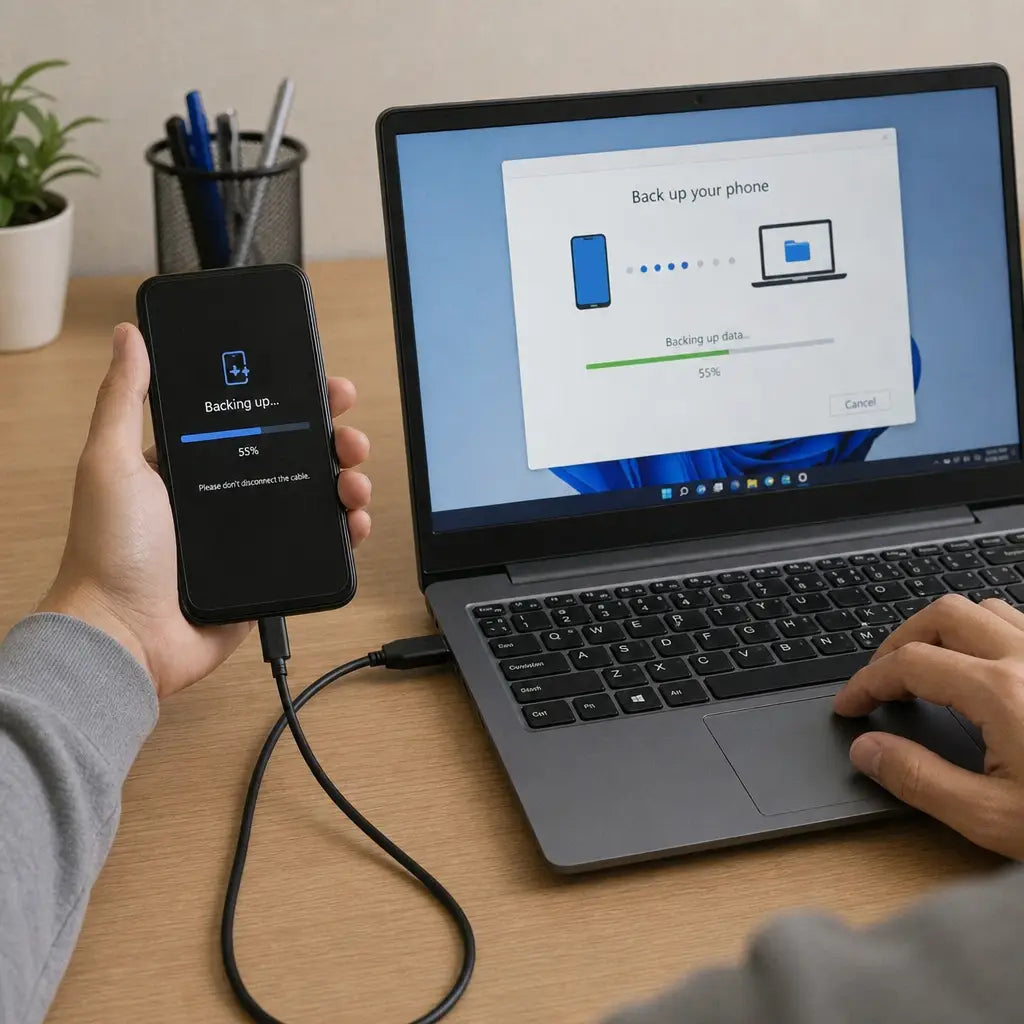
Never begin a teardown without securing your personal information. Knowing how to back up data before serviceis a non-negotiable step. Use native cloud services (like iCloud or Google Drive) or physically connect your phone to a laptop to create a local backup.
If your device is severely damaged and you cannot navigate the menus, recovering data from broken hardwarecan be tricky. Sometimes, plugging a phone with a dead screen into a previously trusted computer will allow you to extract your photos and files. In extreme cases, you may temporarily need to attach a functional screen just to perform the backup.
Deciding Your Approach
Be honest about your technical comfort level. When weighing professional service vs DIY kits, consider the complexity of the job. Replacing a modular battery on an older phone is incredibly beginner-friendly. On the other hand, replacing the back glass on modern flagships—which is often heavily glued to the frame—might be best left to the pros.
Phase 2: Equipping Yourself for Success
A mechanic is only as good as their tools, and the same applies to DIY tech repair. Using a butter knife and a standard Phillips-head screwdriver is a guaranteed recipe for disaster.
Invest in the Right Gear
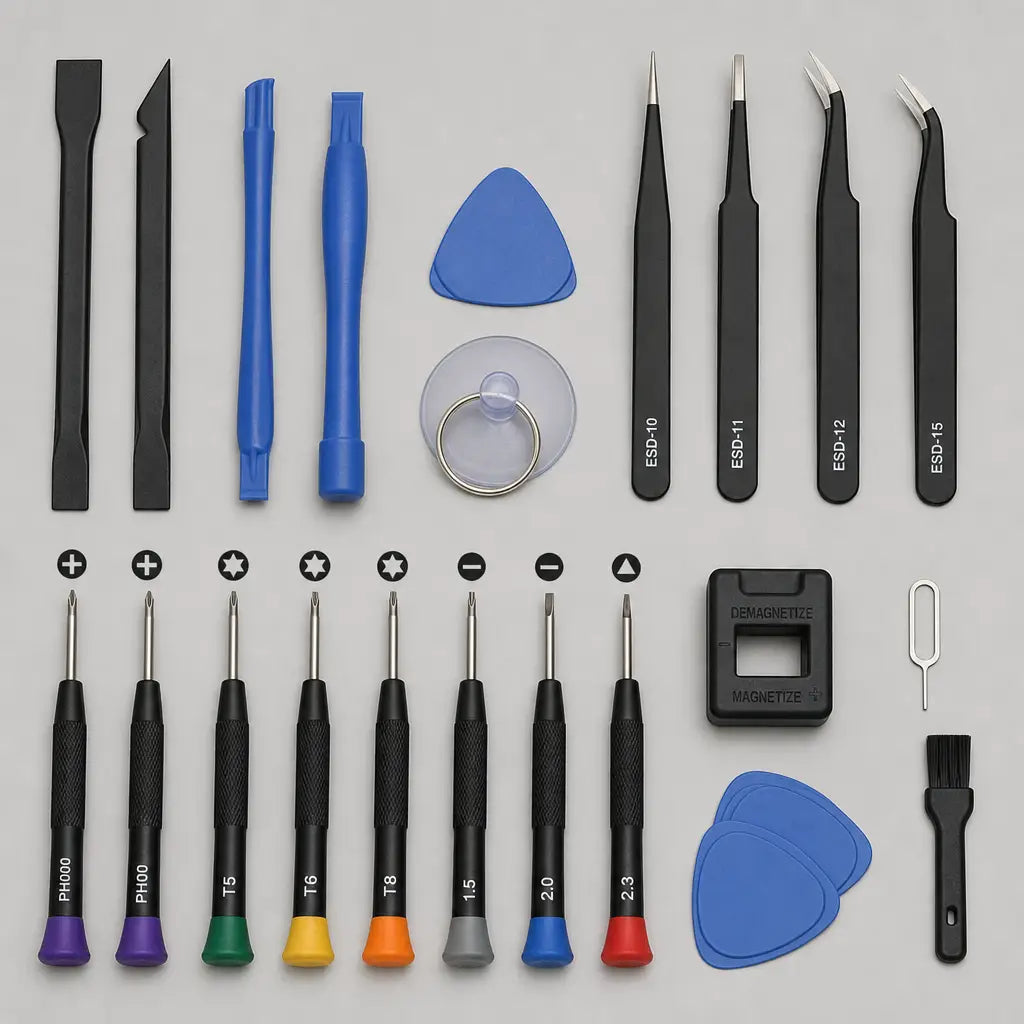
You absolutely need specialized tools for electronic disassembly. A high-quality toolkit should include:
- Precision screwdrivers: Pentalobe, Torx, tri-point, and Phillips heads specifically sized for mobile devices.
- Spudgers and opening picks: Non-conductive plastic tools for safely prying apart delicate components.
- A heat source: An iOpener (a heatable pad) or a controlled heat gun to soften the aggressive adhesive used in modern phones.
- Suction cups: Essential for pulling up glass panels.
- A magnetic project mat: Smartphones contain dozens of microscopic screws of varying lengths. Putting a long screw into a short hole can permanently destroy the motherboard. A magnetic mat helps you map out exactly where each screw belongs.
Sourcing Your Components
When buying replacement hardware, you will immediately face a choice regarding OEM parts vs aftermarket components.
- OEM (Original Equipment Manufacturer) Parts: These are exactly the same as the parts originally installed in your phone. They guarantee perfect compatibility, color accuracy, and performance, but they are more expensive.
- Aftermarket Components: These are made by third-party factories. While they are significantly cheaper, quality varies wildly. Cheap aftermarket screens might have poor color reproduction, lower brightness, or a higher battery drain.
For essential components like batteries and main displays, it is usually worth spending a little extra on high-quality parts from reputable DIY repair vendors.
Phase 3: Tackling Common Repairs
Once you have your tools, your parts, and a clean, well-lit workspace, it is time to get to work.
Dealing with Display Disasters
Fixing cracked smartphone screens is by far the most common DIY tech project. The estimated cost to fix mobile display damage at a retail shop can range from $150 to over $300, whereas doing it yourself usually only costs the price of the part (often $40 to $100 depending on the model).
A standard screen replacement involves applying even heat to the edges of the phone to melt the adhesive, using a suction cup to lift the glass, and carefully slicing through the glue with an opening pick.
When executing a phone screen repair, extreme caution is required around the ribbon cables connecting the display to the motherboard. If you yank the screen off too quickly, you will tear these delicate cables. Additionally, be prepared to transfer small, original components from the old screen to the new one, such as the earpiece speaker, front-facing camera, or biometric sensors.
Powering Up: Battery Swaps
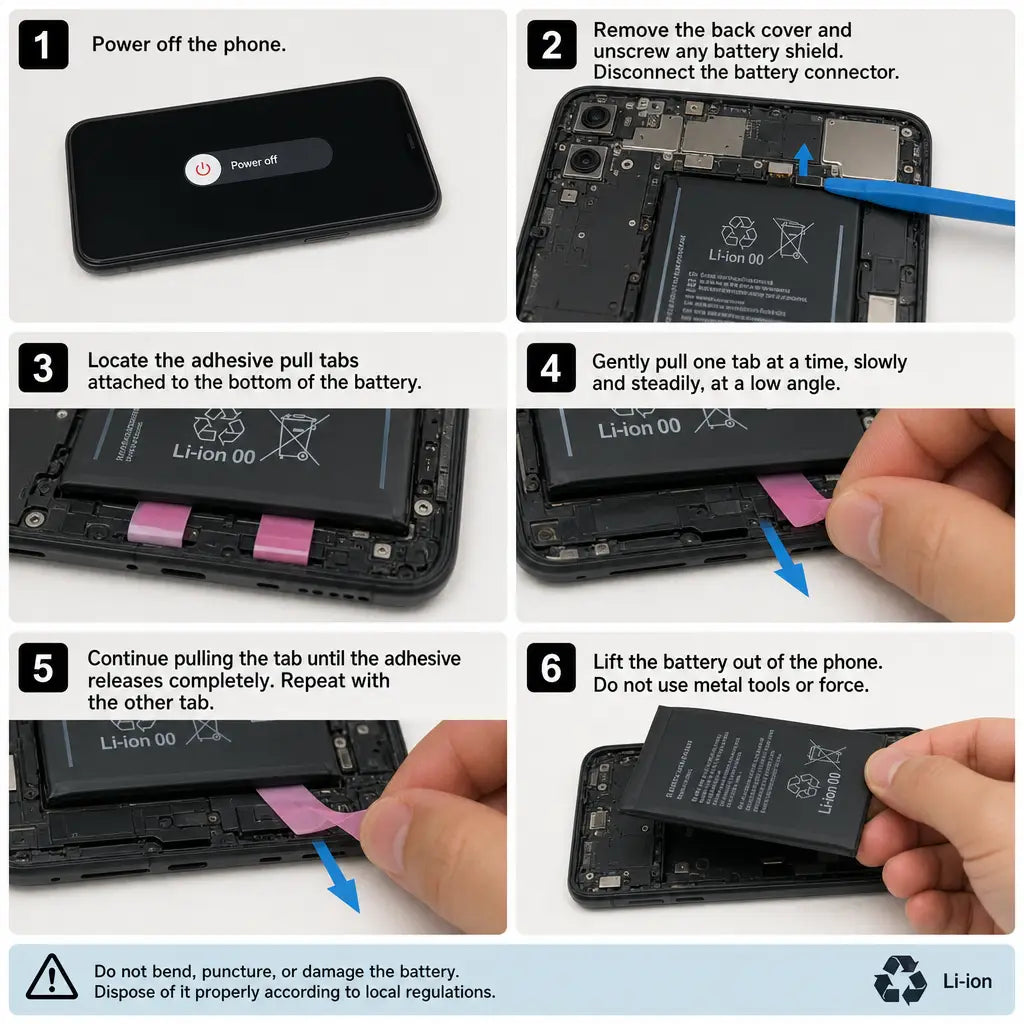
If your phone shuts down randomly or drains rapidly, it is time for a new battery. However, replacing lithium-ion batteries safely is critical. These components are volatile chemical packets.
- Never puncture, bend, or apply direct, intense heat to a battery.
- If the battery is swollen, proceed with extreme caution and wear safety glasses.
- Most modern batteries are secured with "pull-tab" adhesive strips. Pull these strips out slowly and horizontally. If they snap, you will need to use a plastic card and isopropyl alcohol to safely dissolve the glue beneath the battery.
Fixing Power Problems
Sometimes, a phone that won’t turn on doesn't have a battery issue at all. If you find yourself troubleshooting charging port issues, start with the easiest fix first: cleaning. Over months of living in your pocket, lint and dust become compacted into the port. Use a wooden or plastic toothpick (never metal) to gently scoop out the debris.
If cleaning doesn't work, the charging port module itself might be burnt out. Fortunately, on most devices, this module is located on a small, secondary board at the bottom of the phone that can be unscrewed and replaced quite easily.
Phase 4: Handling the Unexpected
Sometimes a repair isn't as straightforward as swapping a modular part. Knowing how to diagnose more complex issues is what separates a novice from an expert.
Water Damage Recovery
Dropping a phone in a pool or a sink requires immediate, specific action. First, forget the age-old myth: do not put it in a bowl of rice. Rice does not absorb moisture fast enough and introduces dust into the phone's internals.
When restoring water damaged mobile devices, time is your biggest enemy. Turn the device off immediately. Do not plug it in to see if it still charges—this will cause short circuits. If you have the tools, open the phone and disconnect the battery right away. You can find the liquid damage indicators location (usually a small white sticker inside the SIM tray slot or near the battery) to confirm water ingress; if the sticker has turned pink or red, water has breached the seals.
To properly treat water damage, completely disassemble the device and bathe the motherboard in 90%+ isopropyl alcohol, gently brushing away corrosion with a soft toothbrush. Let it dry completely before reassembly.
Ghost Touches and Dead Zones
What if your device turns on, but you find your smartphone touchscreen not responding? If the glass isn't cracked, this issue is often caused by a loose digitizer cable. A harsh drop can unseat the press-fit connector inside the phone. Before buying a new screen, try opening the device, disconnecting the screen cable, and firmly snapping it back into place.
Knowing Your Limits
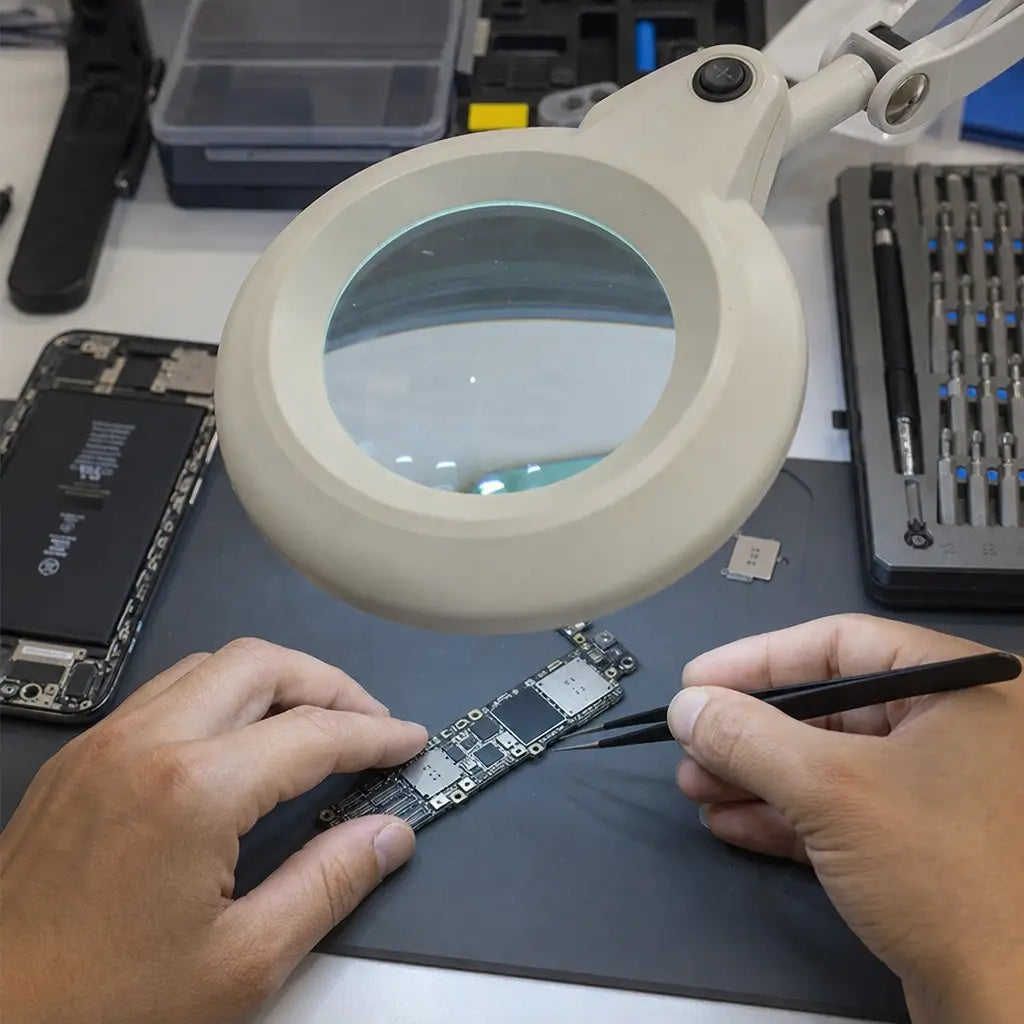
While replacing modular parts like screens, batteries, and cameras is highly accessible, some repairs go far beyond the scope of a standard toolkit. If your phone has suffered severe electrical trauma or microscopic components have been knocked off the main circuitry, you are entering the realm of logic board diagnostics and soldering.
Microsoldering requires expensive microscopes, tiny soldering irons, and a deep understanding of electrical schematics. If you have isolated your phone's issue to a damaged motherboard chip, it is usually time to hand the device over to a specialized data-recovery or microsoldering professional.
The Rewarding World of DIY Tech Repair
Embarking on your first DIY phone repair can feel intimidating, but taking it step-by-step minimizes the risk. By thoroughly assessing your warranty, diligently backing up your files, utilizing the proper specialized tools, and safely handling components, you can breathe new life into a dying device.
Not only does fixing your own phone keep hard-earned money in your wallet, but it also actively reduces harmful e-waste by keeping viable electronics out of landfills. The next time you experience that dreadful, slow-motion drop, don't panic. Take a deep breath, gather your tools, and embrace the empowering experience of fixing it yourself.